Spy Software - PC Spy
 PC Spy is extremely simple to use and allows you to monitor your computer activities secretly while you are away. This pc spy software allows you to capture and
save screen images, showing you exactly what was being viewed on your computer at specific intervals. All screens can be captured, including chat and IM windows, email
windows, webpages, and anything else being viewed on your monitor. PC Spy runs hidden in the background, and all captured screenshots are only viewable with the PC Spy
software and is password protected and not listed on your start menu or desktop. You simply select activate and how often you wish to capture the screenshots, and the spy
software will begin working without any notice to the user. You can also set a start-time if you wish for the software to sit dormant, but most just prefer to set it to
"always run". Please view the "screen captures" section below to view how simple it is to run this sofware. Many even run this while playing computer games so they
can capture screenshots in action. (Runs on all Windows systems).
PC Spy is extremely simple to use and allows you to monitor your computer activities secretly while you are away. This pc spy software allows you to capture and
save screen images, showing you exactly what was being viewed on your computer at specific intervals. All screens can be captured, including chat and IM windows, email
windows, webpages, and anything else being viewed on your monitor. PC Spy runs hidden in the background, and all captured screenshots are only viewable with the PC Spy
software and is password protected and not listed on your start menu or desktop. You simply select activate and how often you wish to capture the screenshots, and the spy
software will begin working without any notice to the user. You can also set a start-time if you wish for the software to sit dormant, but most just prefer to set it to
"always run". Please view the "screen captures" section below to view how simple it is to run this sofware. Many even run this while playing computer games so they
can capture screenshots in action. (Runs on all Windows systems).
Note: This software is designed so that you must download and install it yourself. This will not email logged data to remote locations to prevent
bad use of this software. This is designed this way so you can monitor your pc, and remote monitoring from various locations simply cannot be
done. Also be aware that some people are confused because others have named their software similiar to ours. If you have a program that was
installed via browser hijacking, installed automatically when other software was installed, or cannot uninstall, then it is "not" this
program. You will also know you have our program for sure as long as you downloaded from this website, and you will also have a one click
easy uninstall button on the main window.
How PC Spy works:
Simply run the program and this screen shows below (instructions are given to you when you order, you wont see this installed on your desktop or menu, and you can even move
the program anywhere you want on your computer if you wish).
It's as easy as selecting "always run" and clicking the activate button. You can leave all other options as is without changing it, or you can adjust other options if you
really want to. PC Spy will disappear and begin capturing on your computer. You can then run it again to deactivate it or view your captured images.
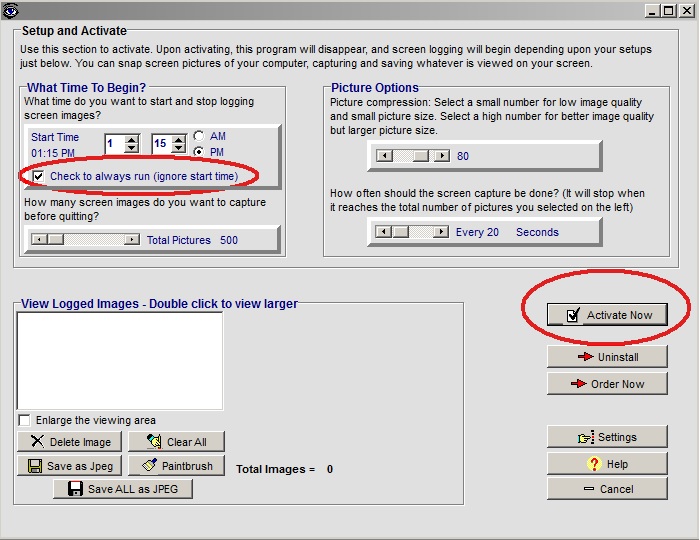
When you run the program again, it always tells you if its currently activated (see circles below). You stop it by simply clicking the deactivate button shown circles.
You also now see your list of captured images, which can be viewed full screen just by clicking them. You can also delete them all or convert to jpeg images if you
want to save them. It's that simple! (You also get full tech support for any questions you may have, you can order the full version here)


Software Features Include:
- Monitors your employee's or children's pc activity at the times you set.
- Captures screen images, showing you exactly what was being viewed on your pc.
- All saved screen images are not viewable with any normal viewer (viewable only with PC Spy).
- Runs completely hidden in the background.
- Contains an "always run" feature, allowing the software to run continuously even if system is rebooted.
- You can also set the start time, and software only begins to capture and monitor at the time you set.
- You can simply choose the number of screens to capture, and how often you want the captures to occur.
- Includes picture compression which allows you to save space on saved images.
- Upon activating software disappears and hides in memory, and automatically shuts down when finished.
- Contains a "deactivate" button which allows the owner to easily stop the software from running.
- Even if the PC is rebooted, the software will restart automatically if necessary.
- Great for quiety monitoring and spying on your children and all other internet activities.
- Also great for capturing screenshots of action games or any other pc activity.
- Captures anything shown on the screen, including webpages, pictures, chat windows, email windows, etc.
- Captured screens can be converted into JPEG images for viewing, saving, or printing.
- Contains a built in viewer which allows only you to view the captured screen images.
- You can also copy and activate the program from a diskette or USB (and then remove), if you wish to make the program even more hidden.
- Free technical help for any questions you may have.
- Free to download and try, only 18.95 if you wish to purchase.
- Runs on all Windows systems.
Privay Notes:
-Software title is never listed on the package if you order postal delivery.
-You can order email delivery only, so no package or mail ever arrives.
-You never receive any information sent to your home or email address after the purchase.
-You can be easily uninstall if you wish by using the uninstall button.
Instructions:
1) First, simply download and run the program to install it. Use the download link at the top.
2) This will simply install the program on your computer. The installation only needs to be done once.
3) Once you have run the program install, a text file will open with simple instructions on how to run this software.
4) This software is designed to be extremely easy to use, and also includes an uninstall for your convenience.
5) If you have any questions, feel free to contact support here.
To Uninstall: Simply click the uninstall button on the main window. If you do not have an uninstall button, then you are not running our
software as many people confuse other software with ours. This software has an easy one click uninstall which will deactivate and remove the software.
Need help? Have questions?
Purchase the registered software version
More software downloads
Thanks for visiting, and feel free to add a link to this page.
|